Showing posts with label QWERTY Androids. Show all posts

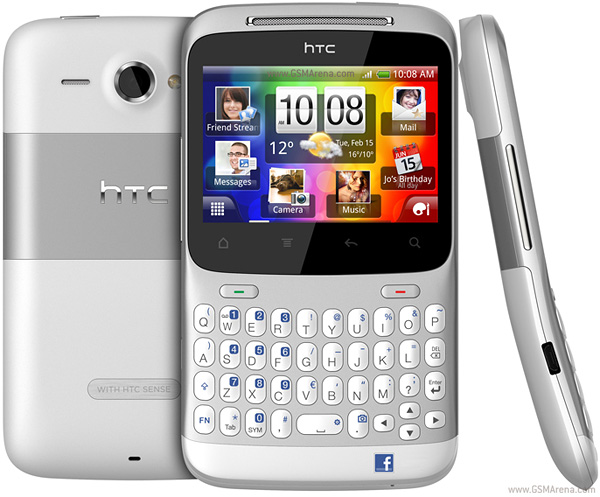
Touch-And-Type HTC Chacha: A Good Idea?

Before the Blackberry, the "CandyBar" phone had dominated the market, thanks to Nokia's 3210, 3310 to 8210/8250 innovations. Prior to the 3210, the 3310 and their ilk, mobile phones had an antenna as part of its standard design. Eventually, CandyBar phones became the norm.

Enter the Blackberry. With its QWERTY keyboard eliciting nothing but hours of pure addiction to typing out SMS', emails and anything text-related on its yummy keyboard, it was no surprise that it was termed the "Crackberry." Like crack, addiction to emails, WORK emails included, happened like wildfire across Blackberry users in the US. Eventually, the rest of the world caught on.

That's why I personally am hesitant to use a touch screen device. In fact, getting the Cherry Mobile Nova was an urgent necessity for me. Managing this Web Magazine without an Android of my own was a bit senseless. BUT that doesn't mean that I authored that idea and wanted a touch screen device in the first place.

And while I am happy-happy-happy with my Cherry Mobile Nova now, and I am loving the fact that it's a touch screen device, it has never replaced my Blackberry. And the rest of my QWERTY phones (which I use as phones) for that matter.

Gee, I have an addiction to phones, especially QWERTY's. I didn't notice. :p

That is why the HTC Chacha is a definite must-have in my Android wishlist. It has the beauty of the Android OS, with the relief of the physical keyboard.

Check out this comparison chart from GSM Arena:

CLICK HERE for full size

This is a "shootout" between the HTC Chacha and the Samsung Galaxy Y Pro Duos.

While technically, it's the Samsung Galaxy Y Pro which should be compared with it, the Galaxy Y Pro Duos puts up a better fight.

I first got to take a look and play with the HTC Chacha in PLDT Jump Experience Center. My first impressions were that I hated the drab dashboard background. But then later, I realized that a user may be able to change that, using the customizations that every Android has.

Other than the drab background, the HTC Chacha has these pros:

  • Awesome Gorilla Glass touch screen. Very sturdy and firm to the touch.
  • Comfortable keypad.
  • The fact that it's touch-and-type.

One major plus for touch-and-type devices is that users won't need to change their mobile device habits between devices. For me, one major adjustment in my early days with the Cherry Mobile Nova was that when I would go back to my non-touch-screen Blackberry Sprint World Edition 8830, I'd find myself absentmindedly touching the screen, in an attempt to use the phone's controls. A split-second later, I realize that I'm no longer on my Cherry Mobile Nova. Thus, it was then that I figured that a touch-and-type device may be an awesome idea.

For a great, thorough review of the HTC Chacha, here is Pocket-Lint.

***
Photo Credits: GSM Arena

What The Android Can Learn From The Blackberry


The Blackberry used to be the gold standard of smartphones. And still, its engineering and construction are still a gulf above the competition, considering its level of encryption and unparalleled data management. And you have to admit that the Android is nowhere near the Blackberry. Not yet, anyway. Thus, it is still worth saying that the Android QWERTY still has a lot to learn from the Blackberry.

Here are my thoughts on why the Blackberry still reigns:


Standard Keys, Across Models

Ever notice that an entry-level model of Nokia QWERTY will differ from the high-end model's keypad orientation? It seems to me like they're still figuring out the kind of QWERTY layout they'll keep. The same is true for the Android QWERTYs. Good luck syncing your keyboard tapping between a Samsung Galaxy Y Pro, an HTC Chacha and a Cherry Mobile Candy Chat.


Military-Grade Encryption

Did you know that the Blackberry got banned in different countries, because it handles data encryption so well, it bypasses these countries' firewalls?

Makes you feel like a spy, if you tote one of those beautiful Blackberry babies, right?

And yet, it gives a user a better night's rest when he knows that no hacker will be able to intercept his work, and even personal mail, thanks to Blackberry's encryption and self-hosted email servers.


Efficient Data Management

Ever wonder how the Blackberry could handle email after email, message after message, then diary entry after another, on its sometimes-jeered internal storage space? Me too. I wonder how it can fit all of that in internal storage sizes ranging from only 64MB on its early mature models (on the Blackberry 8800, still available on the market) to 512 MB storage/512 MB RAM for its latest Blackberry Curve 9380 or even up to 8GB storage/768MB RAM for its Bold Touch 9900, Bold 9790, Porsche Design P'9981 models.

This is what the Android should do. Given that the HTC Chacha has only 512 MB ROM/512 MB RAM to its name, and given how the Android's user-available Internal Storage just fills up so easily, I'd have to sneer at how it should do better than that.


Efficient And Effective Battery Management/Long Battery Life

I may be an Android advocate of sorts, but this is another area that I, along with a good number of disgruntled users, am picking on.

The Android, I guess, is much like Windows in this respect. Unlike the Mac, which has both the hardware AND the proprietary OS with its products, Windows computers have been notorious for battery or power management malfunctions, because the hardware/software interaction was less than seamless. Maybe it's the same for the Android. Since it has been only last year that Google bought out Motorola and will thus be working more closely in developing the "Android Standard," no company has yet perfected the Android's seamless interoperability with their hardware.

It's not sad, it's just that it's a work in progress, for now.

By contrast, Blackberry models have batteries that last for DAYS. Thus, Blackberry users enjoy days of not needing to charge their phones.


Standard Quality Across Models

Because the Android is an Open Source system, allowing OEM's to use the system as they please, there may be differences between brands and models, making the quality different from brand to brand. This is why some Android users who choose less sturdy brands end up dissatisfied or leaving the Android as an ecosystem altogether and switching back to the iPhone or the Blackberry.

While the devs at Android Inc. are working on creating a standard for the OEM's, the user who is particular about the phone's quality will be better off either choosing from the Android's best brands and models, or, sad to say, choose the iPhone or the Blackberry, or even a Nokia or Windows Smartphone instead.


Even though tech pundits are saying that the Blackberry is losing ground in significance, one thing is clear, it is still top-notch in quality, and unparalleled in these areas I outlined.

***
Photo Credits: Wireless Ground

A Writer's Best Friends: Gadgets For The Writer

A writer is a writer is a writer, as they say. Writers will be found carrying their favorite pens -- or a whole handful of them. They love fancy notebooks, and to be able to collect Moleskines is a treat for them. The more successful ones toted the first Macbooks in the Philippines, back in the time when Windows PC's ruled the market. And whenever they can, they will scribble their notes on anything. And I mean anything.

If caught in a coffeeshop without a laptop or even a pen and paper to capture their thoughts with, they'll resort to asking the barista for a handful of table napkins and the store's pen.

I know, because I never thought the day would come when I'd need to resort to that -- but then it did.

But these times mark the age when writing has become profitable (thank you Google and SEO!) and writers can now afford to invest in gadgets and machines that will make their lives and compulsive note-taking a whole world easier.

Writers may have said "hello" to the smartphones and helpful gadgets by now.

Here are some machines that I know would be handy for writers and other compulsive note-takers and thought-catchers:

iPod Touch -- The cheapest thing you can get to an iPhone, without the phone capabilities, the iPod Touch is the note-taker's delight. With a camera that can take pictures of handwriting pretty well, a writer and his pals will no longer need to run to the nearest photocopying shop in order to take copies of notes written. They only need to snap photos of those notes, and they will be able to share notes, and even pages off of books, on the fly.

The notes that can be taken by the iPod Touch's reportedly only 0.7MP cam.

You can even take pictures of pages off of books, which you can share with your other writer-friends.

Another method of recording one's thoughts is in the form of pictures. As they say, "A picture paints a thousand words." If the beauty of the sight that a writer is beholding is just too much for him to express in words, then a picture would surely beef up what he is meaning to write.

Lastly, voice recordings will never be able to replace the beauty, clarity and convenience of reading the written word, but it'll suffice as a way to record thoughts on the fly. With the iPod Touch's configurations starting at 8GB, a writer can certainly ramble hours of thoughts away.

Blackberry, any kind -- The Blackberry cornered the Smartphone market a few years ago, because it pioneered the handy QWERTY machine. Thanks to that, we now have Nokia's QWERTY's and even QWERTY Androids like the HTC Chacha and the Cherry Mobile Candy Chat.

But nothing really beats the Blackberry in how awesome its keys are engineered. They were built to be tapped on, for hours on end. That is why I completely understand why Blackberry users have been stereotyped as "Crackberry" addicts who tap away at their SMS or email even on dinner tables and family gatherings.

A writer can leverage a Blackberry by taking notes on the Blackberry's memo apps, or even on the Calendar. I find that it's very convenient to make notes on the Calendar, as it records the date when you had that thought. Thus, it's easier to go back to when you need to.

What is great about the Blackberry over an iPod Touch or even an iPhone or a touch-screen Android is that it is handy to type on even when you're in an uncomfortable situation. I mean, only crackpots will be writing their next articles on the commuter train while their in transit, right? But it happens, and thoughts and ideas can and will seize you, even when you're in tough spots.

Long bus rides are another thing. It would be hard to tap out a full-length essay or article on an iPod Touch on a bus ride, and it would be all the worse to start talking your thoughts into it, as other passengers may look at you funny for that. Thus, it is definitely quieter and easier to tap away a diary entry, an essay, an article, and even a short story or a novel chapter on one's Blackberry.

Samsung Galaxy Note -- Being a writer and an Android advocate, the Samsung Galaxy Note is definitely high up on my wishlist. As I said, I am attracted to the capabilities of its S-Pen, not to mention the fact that its screen is so wide, it can surely accommodate big fingers typing away.

One big irritation I have with touch screen devices is that I may get the hang of typing long messages on it when I really push myself to do it, but after a while, I find that I've gotten clumsy with typing on touch screens again.

One big promise that the Samsung Galaxy Note has for writers is that it's going to be an all-in mobile thought capture device: something to research with on the fly, something to take notes with, something to record voice messages (to oneself) with, and something that will allow for doodles, screenshots and diagram-making thanks to its S-Pen.

Check out the Samsung Galaxy Note, free on Smart's Unlimited Plan 2000.

While the writer-by-blood will always go back to his favorite tools of the trade: the trusty notebook and the ornate, colorful, or fine-writing pens, this age does favor him, with all the tools, gadgets and toys that will add to, but never replace, the writer's arsenal of pens and paper pads.

***

The Android Searcher: Cherry Mobile Candy


My phone has been with me for almost two years now. As technology advances, it seems that my current phone is getting outmoded as smartphones are invading the local market. I decided, that's it! I need to replace my phone, and soon. While people are mostly attracted to smartphone platforms like the iPhone and Blackberry, a freeware innovation attracted my attention: the Android. Just to backtrack a little, the Android was released in 2005, derived from the Linux kernel. For those who are most familiar with Linux, it is a free operating system. Even though Google bought the development rights and absorbed the Android Dev team as a sub-unit of Google, the Android continues to be a free operating system for mobile smartphones and tablets. Since the Android is a free operating system, a number of companies, most notably Motorola, Samsung, HTC and LG to name a few, adopted the mobile OS. 

In the Philippines, a mobile phone company called Cherry Mobile took the chains in providing cheap but quality mobile phones. And in its moves to expand and grow its market, it also released a good selection of Android phones. The mobile phone brand has been popularized by variety show host Willie Revillame in his show at the local television network, TV5.

On my way to church, I passed by a Cherry Mobile booth in the lower ground floor of Robinson's Galleria. Having Android in mind, I decided to check it out. What caught my attention is the Cherry Mobile Candy and its QWERTY version, Candy Chat. At less than PhP4,000, Cherry Mobile Candy is the cheapest in the market and comes in different colors: even purple, my favorite. 

The phone boasts of being powered by Android Froyo 2.2 Froyo, the Android Kernel version before Android Gingerbread 2.3. Froyo is also the second most utilized Android platform in the market, second only to Gingerbread.

I got to hold an actual phone which is actually lightweight and easy to carry around. The saleslady mentioned that the Cherry Mobile Candy and Candy Chat boasts of a wide variety of apps which one can get for free! Yes, for free, the advantage of Android phones. 

I got to check how the touch screen works but the resistive screen does not go well with my touch; which falls short for me, as I'm pretty fond of mobile games. The resistive touchscreen creates a gaming handicap, as mobile games require a lot of pressing. If you are not a game freak though, the touch resistance may be just fine. For a phone that costs less than PhP4,000, its a good deal with wi-fi capabilities and a 16gB capable SD Card memory slot. Stylish and reliable at a cheap price: not bad at all. 

Will this finally be my new Android phone? Maybe or maybe not. I need to soul-search more for Android phones in the market to find "the one" for me. Follow me as I search for more of Android, its market perks and features that would be worth my pocket's spend.

***

-The Android Searcher

Android Devices Overview: Blackberry-Style, Social Networking-Centered QWERTY Droids

Image by Engadget


When you hear the word "Android," touchscreen phones may be the first to cross your mind. Whether it's an HTC, a Samsung or even a Cherry Mobile or Torque phone, the Android is associated with bar-type touch screen technology.

It may come as a surprise, but there are phones, even from the top Android companies that now carry the QWERTY form factor. Not everyone likes using touchscreen devices, thus it is a need for the top players to give the consumers what they want.

The Blackberry pioneered the QWERTY form factor. When the quintessential email and business phone was released, people who were already addicted to email got even more hooked. The ease of typing, as well as the compelling sound of the keys clacking kept people hooked to their email, that Blackberries soon became a hated dining table and vacation fixture. Parents and spouses wanted to tear the gadgets off of their loved ones so they can have nice family dinners in peace; while family vacations never seemed as restful because the Blackberry-toting email addicts kept checking email and working from their phones.

The iPhone came to break the Blackberry's smartphone monopoly, and a new standard in smartphones was born. The Android was initially created to eat into the iPhone's market share; but eventually, phone makers wanted to eat into the QWERTY market, as well.

The QWERTY market was effectively cornered by Blackberry so far; but Nokia quietly ate into its share with its line of QWERTY smartphones. But somehow, the Nokia can never seem to put up a worthy fight. Blame it on the Symbian platform, which never really posed a formidable defense against malware.

Enter the Android, fully customizable by the mobile phone companies that want to use it. They can use the platform on touch screens, on slider phones, and now, Blackberry-style QWERTY Android models are penetrating the market.

These three turned our heads and caught our Android-spotting eye:


HTC Chacha -- Made by one of the best companies to carry Android, this sleek, slightly curved QWERTY beauty has a dedicated button. Just great; add Facebook to your email and SMS texting addictions and you'll never put your QWERTY Android down.


Motorola Charm -- Cute and chic, this one may become a favorite among the teens and the ladies. Also social-networking centered, this QWERTY Droid has one major limitation, however: it is only available on T-Mobile in the USA. There are local (Philippine) sellers of openline units, however, gray market releases are never as reliable as company-released units.


Acer beTouch E130 -- Acer's entry-level QWERTY Droid, this is a more affordable, but less powerful offering from Acer. Still social networking-centric, this would be great for teens and yuppies who want a budget-friendly Droid option.

Over the coming weeks, we'll be featuring Androids of all shapes and sizes. We'll be giving you lists and even reviews of individual units. Our older posts also contain more reviews and overviews of what the Android world has to offer. So bookmark, subscribe and follow Android Alliance Philippines for hot-off-the-grill news about the Android OS!


Image Credits for Android Phones: GSMArena

You Have Two Choices To Start With

   Image by iPhone Help

With the collection of Android gadgets growing by the second, a gadget-crazy consumer may well get confused with the offerings of the market. From brand alone, the hapless consumer may already get a migraine from the choices to make. Add to that the form factor, the model, the Android version, and as the choices grow, more sources of confusion arise.

How about we start simple? Let's narrow down the choices to just basic Touchscreen or QWERTY?

Advantages of a Touchscreen Android:

1. Easier to play with.
Most high-end Androids, especially from the HTC line, are equipped with Gorilla Glass, which is highly resistant to abuse. So if you're the type who likes decimating pigs in Angry Birds while you wait for your dentist's appointment, the Touchscreen Android is for you.

2. Easier to read with. A Touchscreen Android has larger screen real estate, so you can read emails, documents, and even e-books with better ease. Compare that with a QWERTY Android that may have a touchscreen but the screen real estate has to give way to the QWERTY keypad, reading would definitely be much better on a fully touchscreen model.

3. Easier to surf the Internet with. The Android's main purpose was to be a platform for a mini-computer that happened to be a phone. And if surfing is top priority with you, then you're letting the gadget serve its purpose.

Advantages of a QWERTY Android:

1. Easier to type with.
If you're an email fiend or you just need to manically post status updates thrice an hour, then a QWERTY Android would be perfect for marathon Tweeting, Facebooking and even chatting. On a touchscreen Droid, you'll be all thumbs; on a QWERTY Droid, you'd still be all thumbs, but for better reasons.

2. No more iPhone Fail-esque typing fails. The big problem of touchscreen is that it's really not as good as a physical keyboard. Even the best of the lot, the iPhone (which isn't a Droid, but reportedly has the most-developed and best rendering of the Capacitative Touchscreen so far), still cannot perfect the precision of a physical keyboard. Thus a QWERTY Droid would offer the best of both worlds: a touchscreen display and a QWERTY keyboard beneath it (at least for the Acer beTouch E130, Acer beTouch E210 and HTC Chacha models).

3. Convenient texting, Facebooking, even chatting while walking, in a moving vehicle, or even surreptitiously during classes and meetings. Just don't get caught or have the phone snatched from under your nose.

The choices are going to be simple if you start with only these two options first. What functionalities do you need? What could you live without? The features are laid out for you to decide.